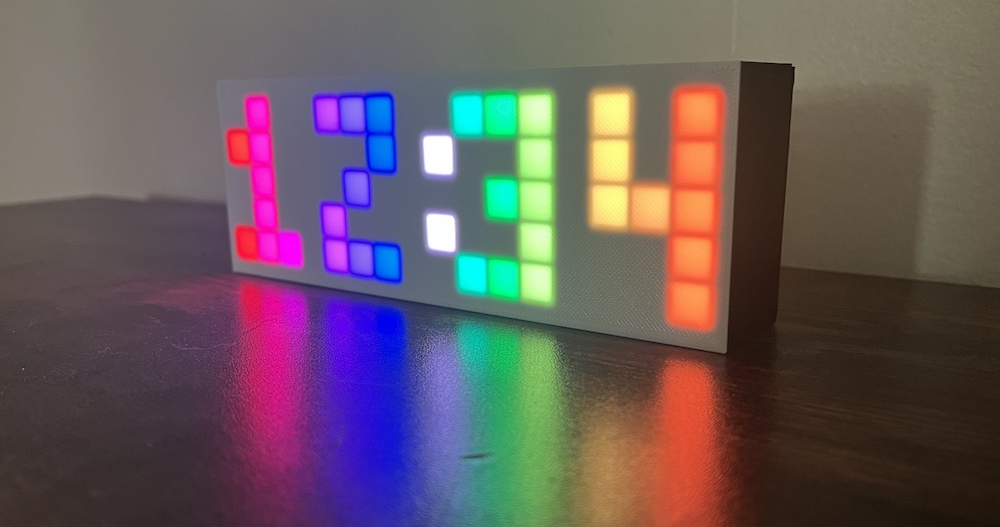

This page will walk through all the parts of the code that have to do with the clock: tracking the hours, minutes and seconds, editing the time, and flashing the digits. The rest of the code, ie. code related to the LEDs or button, will be skipped on this page but covered on the other pages in this section.
Clock code structure
Here’s all the clock-related code in the main rainbow-clock.ino file.
First include other files in this repository. Clock.h contains a clock class that’s used to store the hour, minute, and second, and contains the functionality for editing the time.
#include "Clock.h"Note: .ino files don’t need to be included. All .ino files are automatically concatenated together into one big file when you compile.
Create the clock object.
Clock c;In the main loop, there are three clock related functions: updateTimeFromRTC(), which collects the hour and minute from the RTC library and stores it in the Clock class. updateDigitVisibility(), which controls flashing the digits while editing the time, and updateColonVisibility(), which controls flashing the colon.
void loop() {
  // ...

  // Update the hour/minute variables via the RTC module
  c.updateTimeFromRTC();

  // Flash digits when setting the clock
  c.updateDigitVisibility();

  // Flash the colon every second when showing the time
  c.updateColonVisibility();

  // ...
}
Clock class
This class stores the hour, minute, and second values, converts them into individual digits, and contains the functionality for editing the time and flashing the digits.
Define global variables
Start by defining global variables. These define all the modes, which track if we’re editing the clock, and which digit we’re editing.
// Modes
#define NUM_MODES 4           // 4 modes
#define SHOW_TIME 0           // Mode 0: show the current time
#define EDIT_HOUR 1           // Mode 1: set the hour digit
#define EDIT_MINUTE_DIGIT_1 2 // Mode 2: set the left minute digit
#define EDIT_MINUTE_DIGIT_2 3 // Mode 3: set the right minite digit
Here we define a day, month, and year, but these are actually irrelevant because they don’t show up on the clock. The RTC library requires a day/month/year so this is just a random one.
// (The RTC library requires both time and date. Since the clock only tracks
// time, these values don't do anything.)
#define DAY 11
#define MONTH 8
#define YEAR 2023
These variables define how fast the colon flashes, and how fast the digits flash when editing them.
#define EDIT_TIME_FLASH_DURATION 300 // millseconds per flash when setting time
#define COLON_FLASH_DURATION 1000    // milliseconds per colon flash
Define private and public clock class variables
Private variables cannot be accessed outside of this class. We store things here that either don’t need to be called elsewhere, or that we specifically don’t want to be called elsewhere so we can control what they get set to. Private variables often have a _ prefix, which serves as a reminder that they’re private variables while writing code.
// This class stores all clock-related data, and functions to access the
// individual digits and whether they are visible.
class Clock {

private:
  ESP32Time _rtc;

  // When setting the clock, the digit you're currently setting flashes on and
  // off. `_hideDigit` tracks whether the digit being edited is currently hidden
  bool _hideDigit;

  // The colon always flashes every second, unless you're setting the time, it
  // flashes along with the digit being edited
  bool _hideColon;
The ESP32Time _rtc creates an instance of the ESP32Time library we installed. This is how we get the accurate time from the RTC module on the ESP32. The _rtc object is stored directly on the clock object here because there is nowhere else in the code that needs to access the RTC functions. It’s a private variable to ensure that no other functions outside the Clock class will modify the RTC object, eg. change the time.
_hideDigit and _hideColon are booleans that indicate when to show and hide the digits when they are flashing.
Public variables can be accessed outside of the class.
public:
  int mode; // the current mode

  int hour;   // the current hour in 24-hour time
  int minute; // the current minute
  int second; // the current second
Why does it track seconds if it doesn’t show seconds on the clock? It doesn’t have to, but it does for one small reason: when you unplug the clock, the hour, minute and second are stored in the EEPROM memory. So when you unplug the clock and plug it back in, it will load the exact same time, including seconds. If seconds were omitted, it would start over at seconds=0 when plugged back in.
Convert 24-hour time to 12-hour time
The _get12hour() function converts 24 hour time to 12 hour time.
// Convert 24-hour time to 12-hour time
int _get12hour(int hour24) {
  int hour12 = hour24 % 12;
  return hour12 == 0 ? 12 : hour12;
}
Why not just store 12-hour time and not worry about 24-hour time? The code felt cleaner to store 24 hour time behind the scenes, and then convert to 12-hour time right before displaying digits on the clock. The main reason for this is if someone wanted to change their clock to show 24-hour time, they would have to figure out a few different places in code where 12-hour time is assumed across a couple different files. This way, the only thing they’d have to change is remove wherever _get12hour is called, which is more straightforward to figure out.
Get and set time values
This function updateTimeFromRTC() is called in the main loop() function. It collects the hour minute and second from the RTC module and stores them on this Clock class. It only does this in SHOW_TIME mode, so that the minute doesn’t change while you’re editing the time.
void updateTimeFromRTC() {
  // Update the accurate hour and minute from the RTC module
  // in SHOW_TIME mode only (don't update while setting the clock)
  if (mode == SHOW_TIME) {
    hour = _rtc.getHour(true);
    minute = _rtc.getMinute();
    second = _rtc.getSecond();
  }
}
Why do we need to store the hour/minute/second in a Clock class when we can get the hour minute and second directly from the RTC library? The short answer is because of edit mode. If we just displayed the RTC values directly on the clock, then there’s a chance that while you are editing the time, the number you are editing would change while you are editing it. Then you’d have to go back and edit again! Boring! So we store separate hour and minute variables, and when we’re editing, we’re changing those separate variables, and when we’re not editing, we keep them in sync with the RTC values.
setNewTime() is how we tell the RTC library what time to start with so it can track accurate time from there. It’s called every time we click the button to change a number while in edit mode. It’s also called when we load the time from the EEPROM memory when we power the clock.
void setNewTime(int newHour, int newMinute, int newSecond = 0) {
  // When finished setting the clock, this function gets called to tell the
  // RTC library the newly set time
  _rtc.setTime(newSecond, newMinute, newHour, DAY, MONTH, YEAR);
}
Get individual digits
These “get digit” functions are called by the LED code when it’s time to display an actual digit on the clock. They convert the time values into individual digits. For example at 12:34 these functions return 1, 2, 3, and 4 respectively.
// Separate the hours and minutes into left and right digits
int getHourDigit1() { return _get12hour(hour) / 10; }

int getHourDigit2() { return _get12hour(hour) % 10; }

int getMinuteDigit1() { return minute / 10; }

int getMinuteDigit2() { return minute % 10; }
Update visibility of digits and colon
These “update visibility” functions are called from the main loop() function. They use a nifty function EVERY_N_MILLISECONDS provided by the FastLED library. Every 300 milliseconds, toggle the _hideDigit boolean from true -> false -> true etc. _hideDigit is toggled even when we’re not in edit mode and the digit isn’t flashing. But the digit doesn’t flash all the time because as you’ll see in the next functions, both _hideDigit AND edit mode are checked before actually hiding the digit.
void updateDigitVisibility() {
  // If editing the time, flash the digit being edited every 300ms
  EVERY_N_MILLISECONDS(EDIT_TIME_FLASH_DURATION) { _hideDigit = !_hideDigit; }
}

void updateColonVisibility() {
  // Flash the colon every 1 second
  EVERY_N_MILLISECONDS(COLON_FLASH_DURATION) { _hideColon = !_hideColon; }
}
Get current visibility of digits and colon
The rest of these “is visible” functions return whether or not each digit and the colon are currently visible or hidden.
bool isHourDigit1Visible() {
  // Also hide the left hour digit if it's zero, ie. show 5:00 instead of
  // 05:00
  return getHourDigit1() != 0 && (mode != EDIT_HOUR || !_hideDigit);
}

// This is the same as saying: if we're not editing the hour, return true.
// If we are, and `_hideDigit` is false, also return true. Otherwise,
// return false.
bool isHourDigit2Visible() { return mode != EDIT_HOUR || !_hideDigit; }

bool isMinuteDigit1Visible() {
  return mode != EDIT_MINUTE_DIGIT_1 || !_hideDigit;
}

bool isMinuteDigit2Visible() {
  return mode != EDIT_MINUTE_DIGIT_2 || !_hideDigit;
}

bool isColonVisible() {
  // The colon flashes at different speeds depending on the mode. When editing
  // the clock, the colon flash aligns with the digit flash. Otherwise, it
  // flashes slower.
  return mode == SHOW_TIME ? !_hideColon : !_hideDigit;
}
EEPROM
The EEPROM is internal memory on the ESP32 microcontroller that doesn’t get lost when you unplug the ESP32 from power. We use it to store the time (hour, minute, second) so that if you unplug the clock and plug it back in, the last stored time will be loaded. (However, when you plug the clock back in, it doesn’t know what time it is now, only what time it was when you unplugged it. So if you unplug the clock for 20 minutes and plug it back in, it will be 20 minutes behind.)
EEPROM code in main loop structure
When the board starts up, we collect the time values from EEPROM, and in the main loop, we update the EEPROM with the new time values.
#include <EEPROM.h>    // Built in

// ...

void setup() {
  // ...

  // Read initial hour/minute from EEPROM
  readEEPROM();
}

void loop() {
  // ...

  // Store the hour/minute variables in memory
  updateEEPROM();

  // ...
}
Read and update EEPROM
Each EEPROM variable needs an address to write to, here we define those as 0 1 and 2.
// EEPROM variables
#define EEPROM_SIZE 3   // 3 bytes stored in EEPROM
#define EEPROM_HOUR 0   // Variable 0: hour
#define EEPROM_MINUTE 1 // Variable 1: minute
#define EEPROM_SECOND 2 // Variable 2: second
The EEPROM library provides the functions EEPROM.begin to set the number of bytes we want to use, and EEPROM.read to read the byte from EEPROM. Then we pass those values to the Clock object c to set the time.
void readEEPROM() {
  EEPROM.begin(EEPROM_SIZE);
  int hour = EEPROM.read(EEPROM_HOUR);
  int minute = EEPROM.read(EEPROM_MINUTE);
  int second = EEPROM.read(EEPROM_SECOND);
  c.setNewTime(hour, minute, second);
}
Every 1 second, write the new time values with EEPROM.write, and call EEPROM.commit to save changes.
void updateEEPROM() {
  EVERY_N_SECONDS(1) {
    EEPROM.write(EEPROM_HOUR, c.hour);
    EEPROM.write(EEPROM_MINUTE, c.minute);
    EEPROM.write(EEPROM_SECOND, c.second);
    EEPROM.commit();
  }
}
EEPROM References: Arduino EEPROM library and ESP differences from the standard EEPROM class.