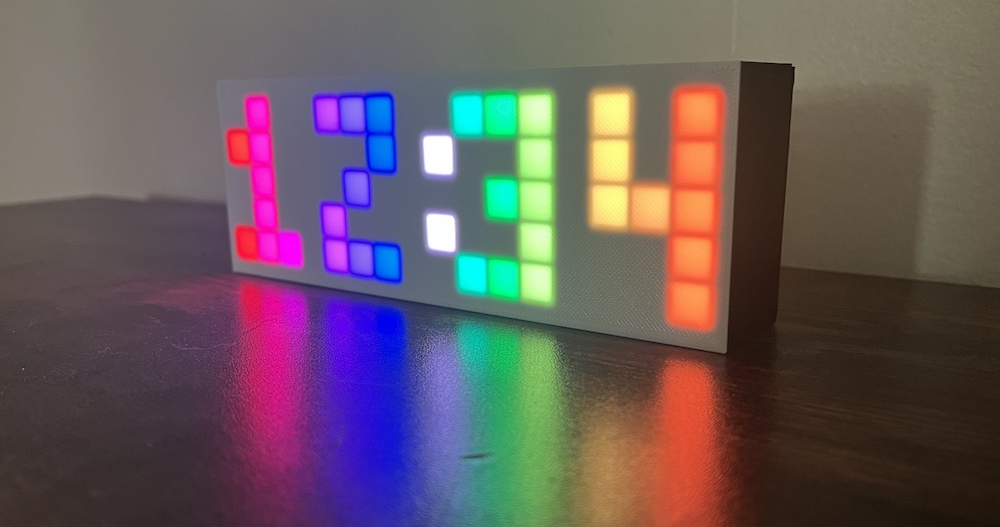

This page will walk through all the parts of the code that have to do with reading and handling the button state. The rest of the code related to the clock and LED functionality will be skipped on this page but covered on the other pages in this section.
Button code structure
Include the Button.h class file in this repository.
#include "Button.h"Note: .ino files don’t need to be included. All .ino files are automatically concatenated together into one big file when you compile.
Define the pin number the button is soldered to on the ESP32.
// Button variables
#define BUTTON_PIN 15 // pin D15 on the ESP32
Create an instance of the button class named button, tell it the pin number we defined.
Button button(BUTTON_PIN);The setupButton function configures the specified pin to behave as an input.
void setup() {
  // Tell the button object which pin to read from
  button.setupButton();

  // ...
}
On every iteration of the loop, the handleButtonState function reads the current state of the button and checks if a click or a long press has occurred, and if one has, it handles it by calling the necessary functions in the clock code. The code within the function is explained further below.
void loop() {
  // ...

  // Read the button state from the pin and check for a click or a long press
  handleButtonState();

  // ...
}
button.ino
handleButtonState()
Here’s the whole function. We’ll go through each piece one at a time next.
void handleButtonState() {
  // Read the value from the data pin
  button.update();

  if (button.longPressed) {
    // Go to next mode when button is long pressed
    c.mode = (c.mode + 1) % NUM_MODES;
  }

  if (button.clicked) {
    // Increment the digit according to which mode we're in
    if (c.mode == EDIT_HOUR) {
      c.hour++;
      c.hour %= 24;
    } else if (c.mode == EDIT_MINUTE_DIGIT_1) {
      c.minute += 10;
      c.minute %= 60;
    } else if (c.mode == EDIT_MINUTE_DIGIT_2) {
      c.minute++;
      if (c.minute % 10 == 0) {
        // If the minute wraps from 9 -> 10, it increments the left minute
        // digit, which was already set in the last edit mode, so subtract 10 to
        // keep the left minute digit the same
        c.minute -= 10;
      }
      c.minute %= 60;
    }

    // Tell the clock object that this is the new time
    if (c.mode != SHOW_TIME) {
      c.setNewTime(c.hour, c.minute);
    }
  }
}
On the first line, update is called, (a function defined on the Button class, and is explained further below) which reads the state of the button from the pin on the ESP32 and determines if a click or a long press occurred.
button.update();Handle a long press
If a long press occurred, we go to the next mode. Long pressing over and over will continuously cycle through all 4 modes: SHOW_TIME, EDIT_HOUR, EDIT_MINUTE_DIGIT_1, EDIT_MINUTE_DIGIT_2. % NUM_MODES is used to wrap back to 0 every time we reach the last mode. 0 -> 1 -> 2 -> 3 -> 0 -> etc
if (button.longPressed) {
  // Go to next mode when button is long pressed
  c.mode = (c.mode + 1) % NUM_MODES;
}
Handle a click
If a click occurred, figure out which edit mode we’re in. (If we’re not in edit mode, it will run through all this code without anything happening.) In each if block, edit the digit: hour digit, left minute digit, etc. Then, in any edit mode, set that new time with c.setNewTime.
if (button.clicked) {
  if (c.mode == EDIT_HOUR) {
    // ...
  } else if (c.mode == EDIT_MINUTE_DIGIT_1) {
    // ...
  } else if (c.mode == EDIT_MINUTE_DIGIT_2) {
    // ...
  }
  if (c.mode != SHOW_TIME) {
    c.setNewTime(c.hour, c.minute);
  }
}
Jumping in to what happens within one of the if blocks, increment the hour digit, then use %= 24 to wrap back to 0 every time 24 is reached (24 % 24 = 0).
if (c.mode == EDIT_HOUR) {
  c.hour++;
  c.hour %= 24;
} ...
The right-hand-side minute digit has one extra step because when that right digit wraps from 9 -> 0, the minute value increments from 9 -> 10, which will also increase the left minute digit by 1. But we already set the left minute in the previous edit mode, so we want to keep it the same as it was. So we handle this special case by subtracting 10 every time the digit wraps from 9 -> 0, ie. every time the new incremented value is divisible by 10 (% 10).
c.minute++;
if (c.minute % 10 == 0) {
  c.minute -= 10;
}
c.minute %= 60;
Button.h class
The Button class includes the Timer library and one global variable:
#include "Timer.h"

#define LONG_PRESS_DURATION 2000 // Hold button for 2 seconds to long press
Timer.h
This is a simple struct we’ll use to time a long press. Here is the definition of the class, which is in the file Timer.h.
struct Timer {
  unsigned long totalCycleTime;
  unsigned long lastCycleTime;
  void reset() { lastCycleTime = millis(); };
  bool complete() { return (millis() - lastCycleTime) > totalCycleTime; };
};
Example Timer usage: (this is not rainbow clock code)
Timer myTimer = {10000}; // Set up a timer to last 10 seconds (10000 milliseconds)

myTimer.reset(); // Start the timer

if (myTimer.complete()) {

  // ... Do something here ...

  myTimer.reset(); // Start the timer again (if you want)
}
Button class variables and constructor
The timer we’ll use to time a long press is set up as the private variable _longPressTimer on the button class. Other private variables include pin number, the previous button state, and a flag to indicate if a long press was triggered.
class Button {

private:
  int _pin;                         // Data pin on the ESP32
  int _prevState = BUTTON_UP;       // The state of the button in the last loop
  bool _longPressTriggered = false; // Prevents a click from triggering when
                                    // lifting the button up after a long press
  Timer _longPressTimer = {LONG_PRESS_DURATION}; // For timing a long press
Public variables include the two button states LOW and HIGH which represent voltages. In this case, the button reads as LOW when it’s held down, and HIGH when it’s not held. clicked and longPressed are the two button statuses to be referenced outside this class to check if the button was just clicked or long pressed.
public:
  static constexpr int BUTTON_DOWN = LOW;
  static constexpr int BUTTON_UP = HIGH;

  bool clicked = false;     // Sets to true when button is clicked
  bool longPressed = false; // Sets to true when button is lock pressed
When the button is constructed, the pin number on the ESP32 is passed in. The setupButton is called from the main setup() function to orient the pin as an input pin.
Button(int pin) { _pin = pin; }

void setupButton() { pinMode(_pin, INPUT_PULLUP); }
Update the button status
The purpose of the update() function is to set the public variables clicked and longPressed so that somewhere else in code can reference them, eg. with if (button.clicked) {, and cause things to happen after button interactions.
The first thing that happens is we read the signal from the pin. This sets the state to whether the button is up or down right now.
void update() {
  int state = digitalRead(_pin); // Read the signal from the pin
Reset the click and long press status to false. If a click or a long press happened in the previous iteration of the loop, then one of these will be true. Reset them to false so we don’t trigger another click or long press.
  // Reset the click and long press status
  clicked = false;
  longPressed = false;
There are three button conditions being checked for:
-
The button is down and was previously up: Could be a click or a long press. We won’t know until the button is released. Start the timer.
if (state == BUTTON_DOWN && _prevState == BUTTON_UP) { _longPressTimer.reset(); -
The button is down and it’s been down for 2 seconds: Trigger a long press. Also start the timer over. Also set the
_longPressTriggeredflag totrueuntil the button is lifted. This flag prevents a click from triggering when the user releases the button from this long press.} else if (state == BUTTON_DOWN && _longPressTimer.complete()) { longPressed = true; _longPressTimer.reset(); _longPressTriggered = true; // Set this to true until button is lifted -
The button is up and was previously down: Trigger a click. Unless its the user releasing the button after just long pressing. In that case, don’t trigger a click. Check if it was a long press by checking
_longPressTriggered, and if so, reset it back tofalseto indicate the long press is complete. If it wasn’t a long press, proceed with triggering a click.} else if (state == BUTTON_UP && _prevState == BUTTON_DOWN) { if (_longPressTriggered) { _longPressTriggered = false; } else { clicked = true; } }
Next time around, this state will the previous state.
  _prevState = state;
}